Sylwch: Cyflwynir pob gweithdy a phob gohebiaeth yn Saesneg. Mae cynnwys ein gweithdai yn cyd-fynd a Maes Dysgu a Phrofiad Gwyddoniaeth a Thechnoleg Cwricwlwm i Gymru. Mae croeso cynnes i ysgolion cyfrwng Cymraeg.

Workshop setup: classroom or hall, by workshop

Every Hyett workshop has a recommended room setup. This page shows real photos of each setup, plus the layout your school needs to provide, so you can pick the right space and book the right number of students.

Last updated: May 2026

Room and group-size rules

A standard classroom comfortably holds up to 32 students per session and that is the cap for every classroom delivery. Some workshops scale higher when delivered in a hall, because more tables and floor space fit. The table below shows the maximum students per session for each workshop and room combination.

Hall-required workshops (Early Engineers Express, Advanced STEMbotics, Drone Coding) need the open floor space of a hall regardless of group size.

For larger cohorts than the per-session maximum, you book additional sessions across the day. Most schools cover a full year group with two or three sessions.

Setup by workshop

One row per workshop variant. Workshops that work in both a classroom and a hall appear twice so you can compare the two setups directly.

Tip: where multiple photos exist for a setup, use the arrows or dots beneath each photo to cycle through layout variants.

Setup photosWorkshopRoomMax per sessionLayout & what your school provides
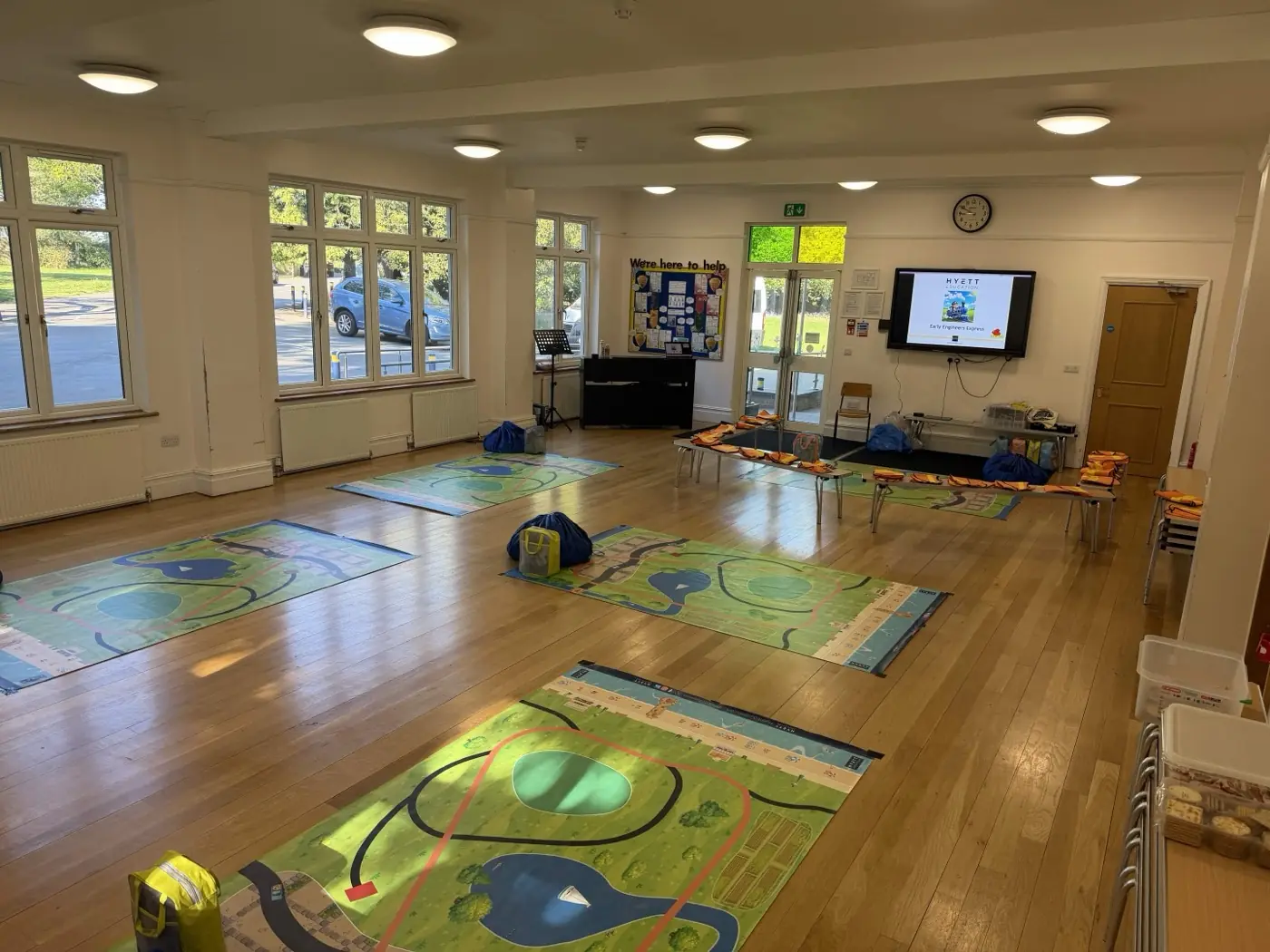
A small school hall set up for Early Engineers Express, with large floor mats laid out on a wooden floor, benches and chairs along the side, and a screen showing the workshop title at the front

Small hall with benches and floor mats. Workshop slide on screen at the front.

Photo 1 of 2: A small school hall set up for Early Engineers Express, with large floor mats laid out on a wooden floor, benches and chairs along the side, and a screen showing the workshop title at the front
Early Engineers Express
EYFS-KS1 (ages 3-7)
Hall required32Hall or large activity room required. Floor mats laid out as activity zones. Benches or low chairs around the front mat for students to gather. Screen or projector at the front.
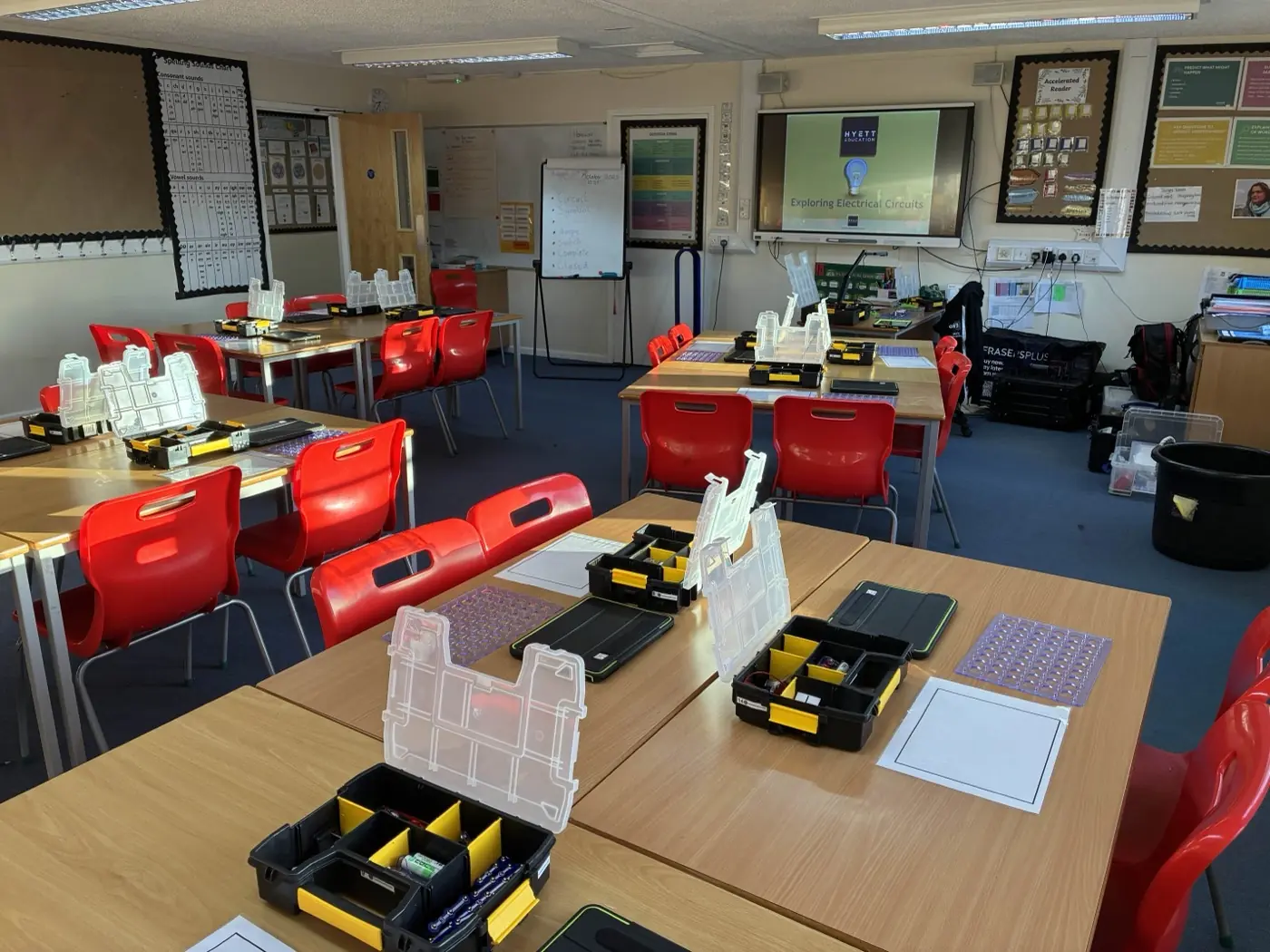
A primary classroom set up for Electricity & Circuits, with desks in groups of four, each carrying circuits kits and equipment, plus a board at the front

Desks in groups of four with circuits kits laid out at each station.

Electricity & Circuits
KS2 (ages 7-11)
Classroom32Projector, screen or interactive whiteboard at the front. Students working in pairs, with one kit per desk. Ensure space between tables for the instructor to circulate.
A school hall set up for Electricity & Circuits, with trestle tables arranged in groups across the hall and circuits kits laid out on each table

Trestle tables in groups across the hall. Up to 45 students.

Electricity & Circuits
KS2 (ages 7-11)
Hall45Trestle tables in groups across the hall. Projector at the front. Power sockets accessible from the instructor station. Room to walk between groups so the instructor can circulate.
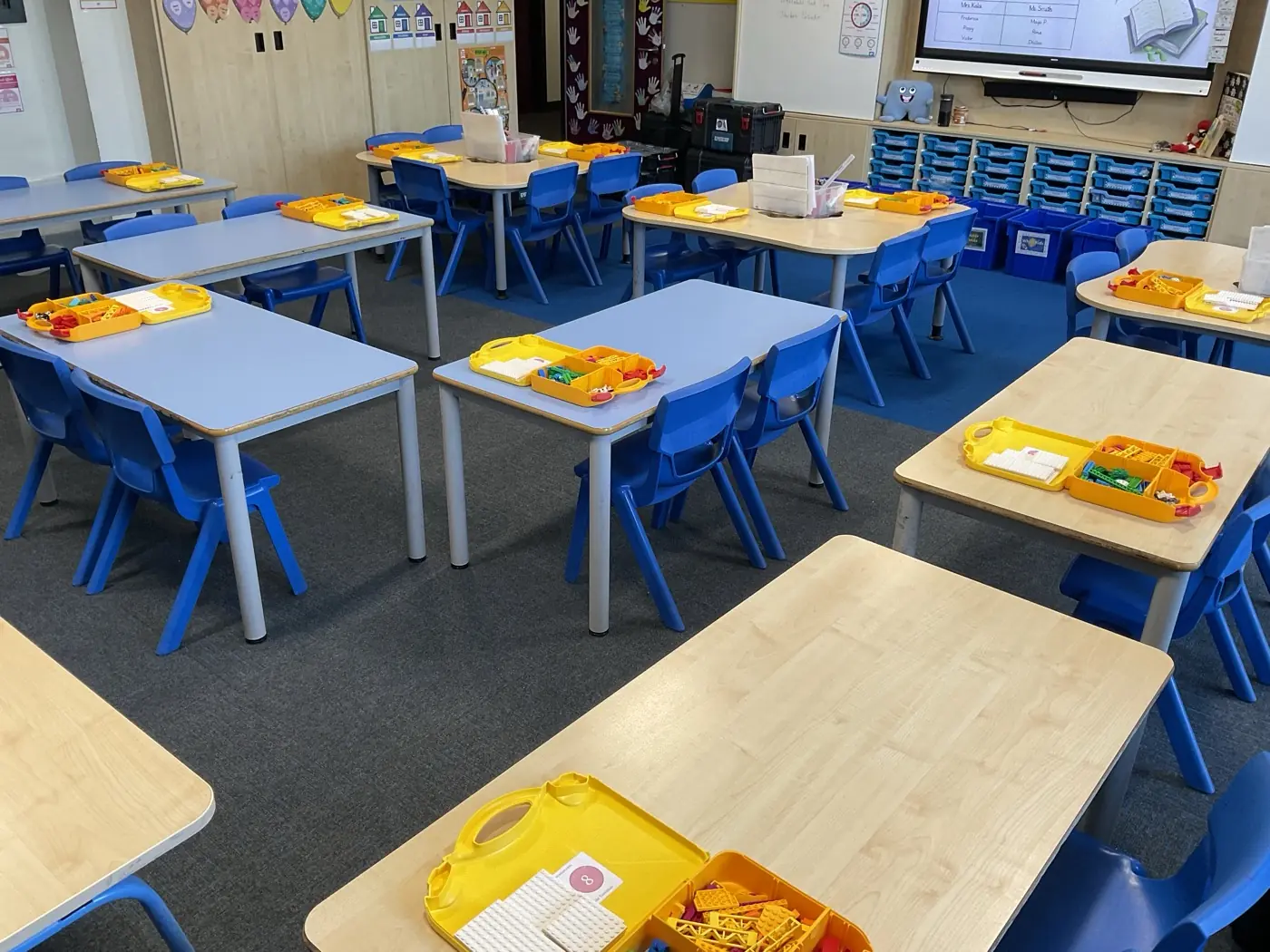
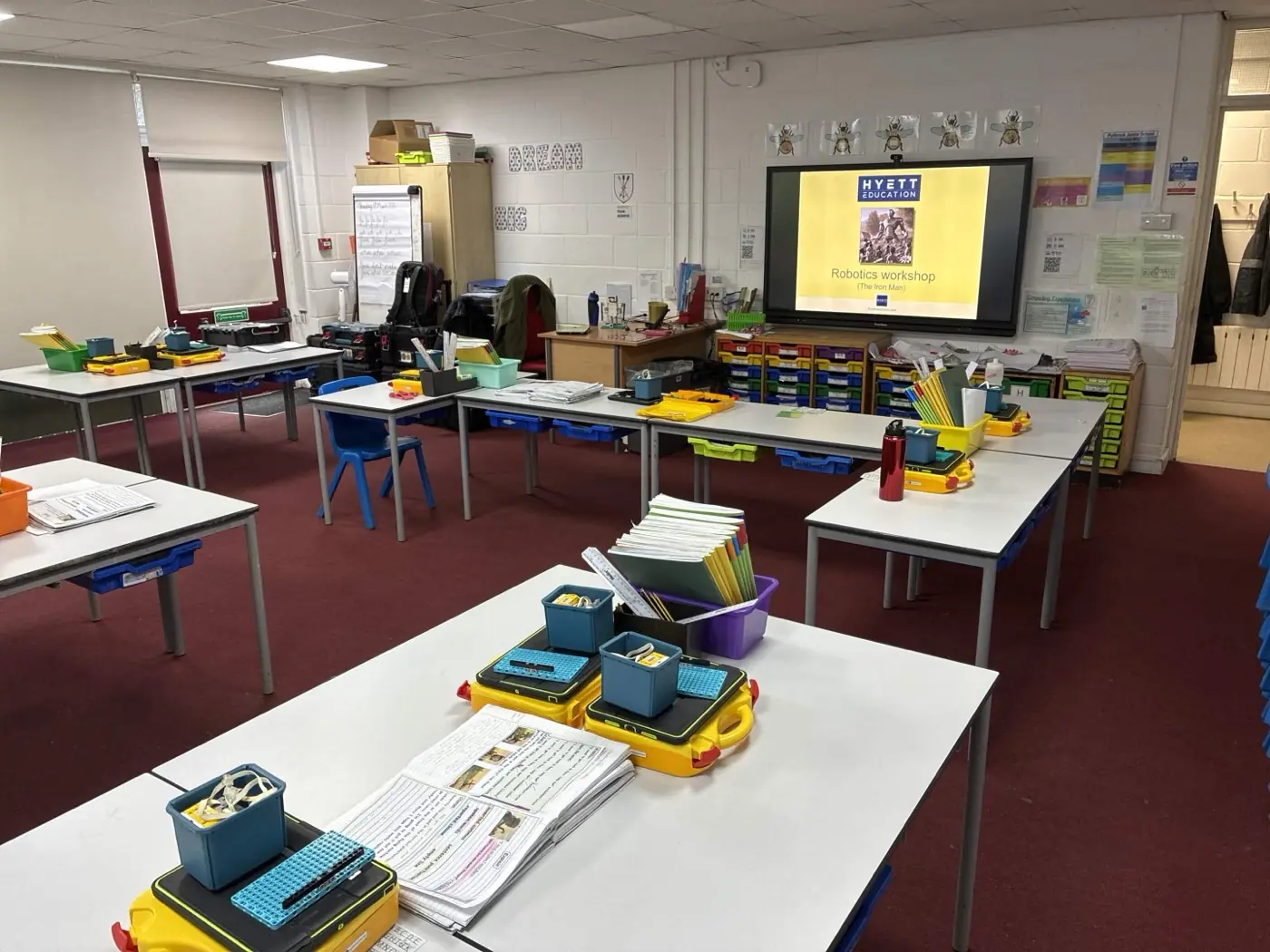
A primary classroom set up for Beginner STEMbotics, with desks in pairs and Lego-style robotics kits on each desk

Desks in pairs, robotics kits on every desk.

Photo 1 of 3: A primary classroom set up for Beginner STEMbotics, with desks in pairs and Lego-style robotics kits on each desk
Beginner STEMbotics
KS1-KS2 (ages 5-11)
Classroom32Desks in pairs (one desk per pair). Projector or screen at the front. Leave space for the instructor to circulate between pairs.
A school hall set up for Beginner STEMbotics, with mobile dining tables arranged around the perimeter and robotics kits ready for students

Mobile dining tables around the perimeter. Up to 60 students.

Photo 1 of 3: A school hall set up for Beginner STEMbotics, with mobile dining tables arranged around the perimeter and robotics kits ready for students
Beginner STEMbotics
KS1-KS2 (ages 5-11)
Hall60Dining tables or trestle tables in a U-shape, square or grid (one table per pair). Projector at the front. Leave space for the instructor to circulate.
A classroom set up for Intermediate STEMbotics, with desks in groups and laptops paired with robotics kits at each station

Desks in pairs with laptops paired to robotics kits.

Intermediate STEMbotics
KS2-KS4 (ages 7-16)
Classroom32Desks in pairs (one desk per pair). Projector or screen at the front. Suitable when one class is attending at a time.
A school hall set up for Intermediate STEMbotics with exam tables in rows and a clear central activity area for robotics challenges

Exam tables in rows around a central activity area. Up to 60 students.

Photo 1 of 4: A school hall set up for Intermediate STEMbotics with exam tables in rows and a clear central activity area for robotics challenges
Intermediate STEMbotics
KS2-KS4 (ages 7-16)
Hall60Exam tables in rows or pairs, trestle tables in groups, or dining tables in a U-shape. 20 tables (or 40 paired exam tables) required for a group of 60 students. Central activity area kept clear for testing and robotics challenges. Projector at the front.
A school hall set up for Advanced STEMbotics, with tables in pairs around the perimeter and a large central activity area for robotics builds and Python challenges

Tables in pairs around the perimeter, large central activity area.

Photo 1 of 2: A school hall set up for Advanced STEMbotics, with tables in pairs around the perimeter and a large central activity area for robotics builds and Python challenges
Advanced STEMbotics
KS3-KS5 (ages 11-18)
Hall required32Tables in pairs around the perimeter (16 paired tables for 32 students). Large central activity area for testing builds. Projector at the front.
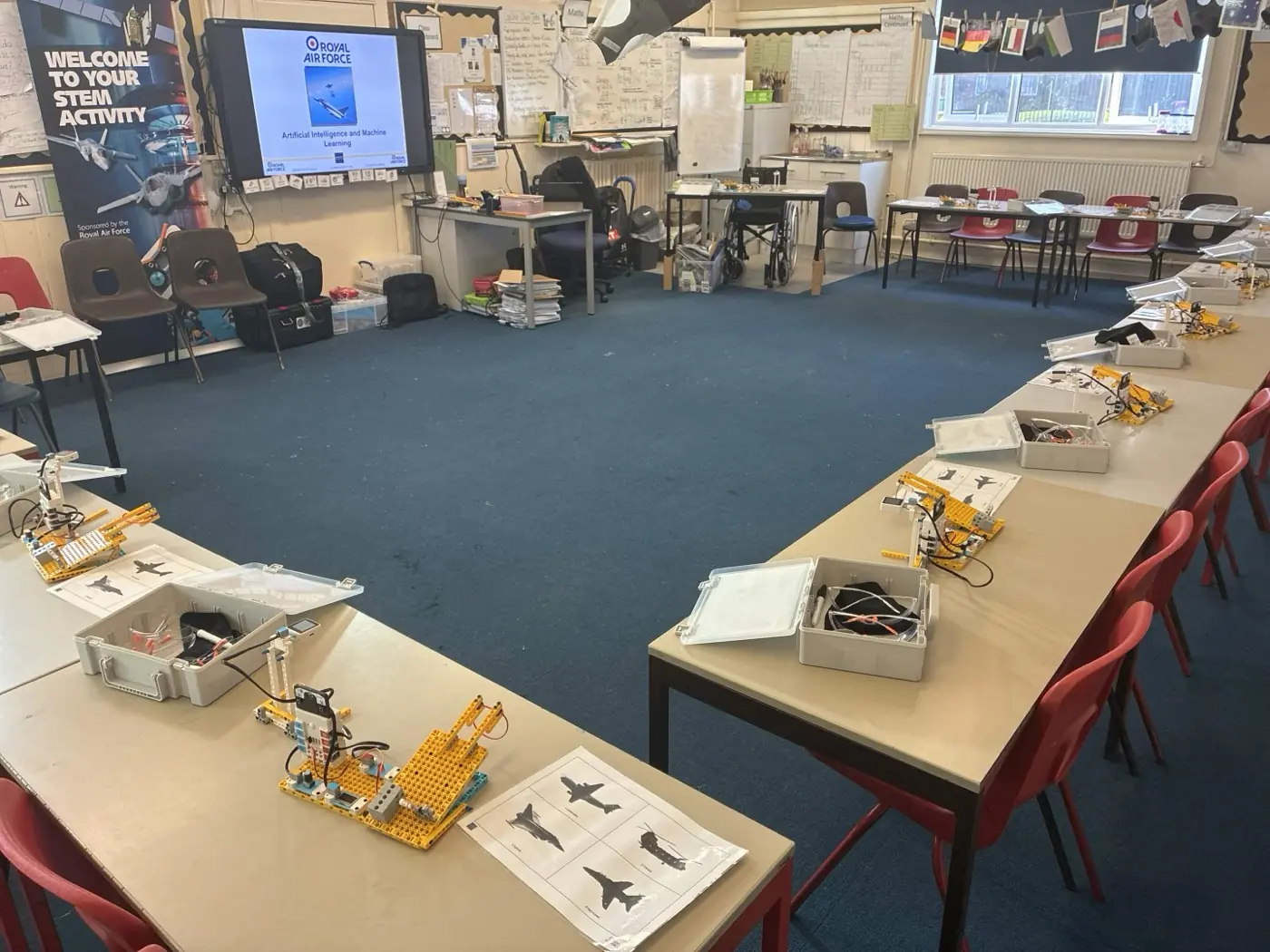
A classroom set up for AI and Machine Learning, with desks in groups, laptops on each desk and a screen showing the workshop at the front

Desks in groups with laptops on every station.

Photo 1 of 2: A classroom set up for AI and Machine Learning, with desks in groups, laptops on each desk and a screen showing the workshop at the front
AI & Machine Learning
KS2-KS4 (ages 7-16)
Classroom32One desk per pair (16 desks for 32 students), arranged around the perimeter of the room leaving a central space for flight launches. Laptops provided by Hyett. Projector or screen at the front.
A school hall set up for AI and Machine Learning, with trestle tables in groups, seating for every student and a projector at the front

Trestle tables in groups with seating for every student.

Photo 1 of 2: A school hall set up for AI and Machine Learning, with trestle tables in groups, seating for every student and a projector at the front
AI & Machine Learning
KS2-KS4 (ages 7-16)
Hall32Trestle tables in groups or classroom tables brought into the hall (one table per pair). Laptops on each table. Projector at the front.
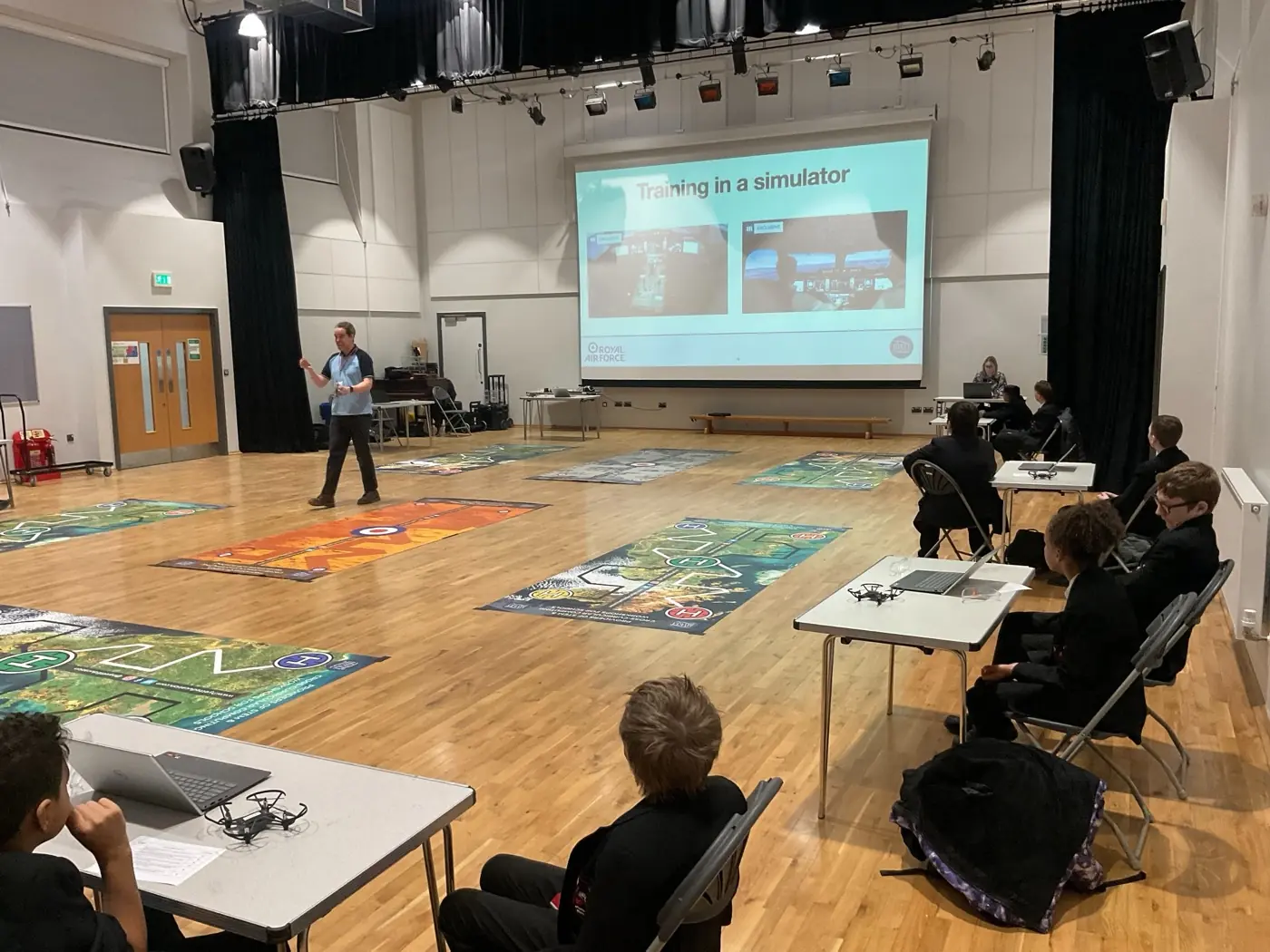
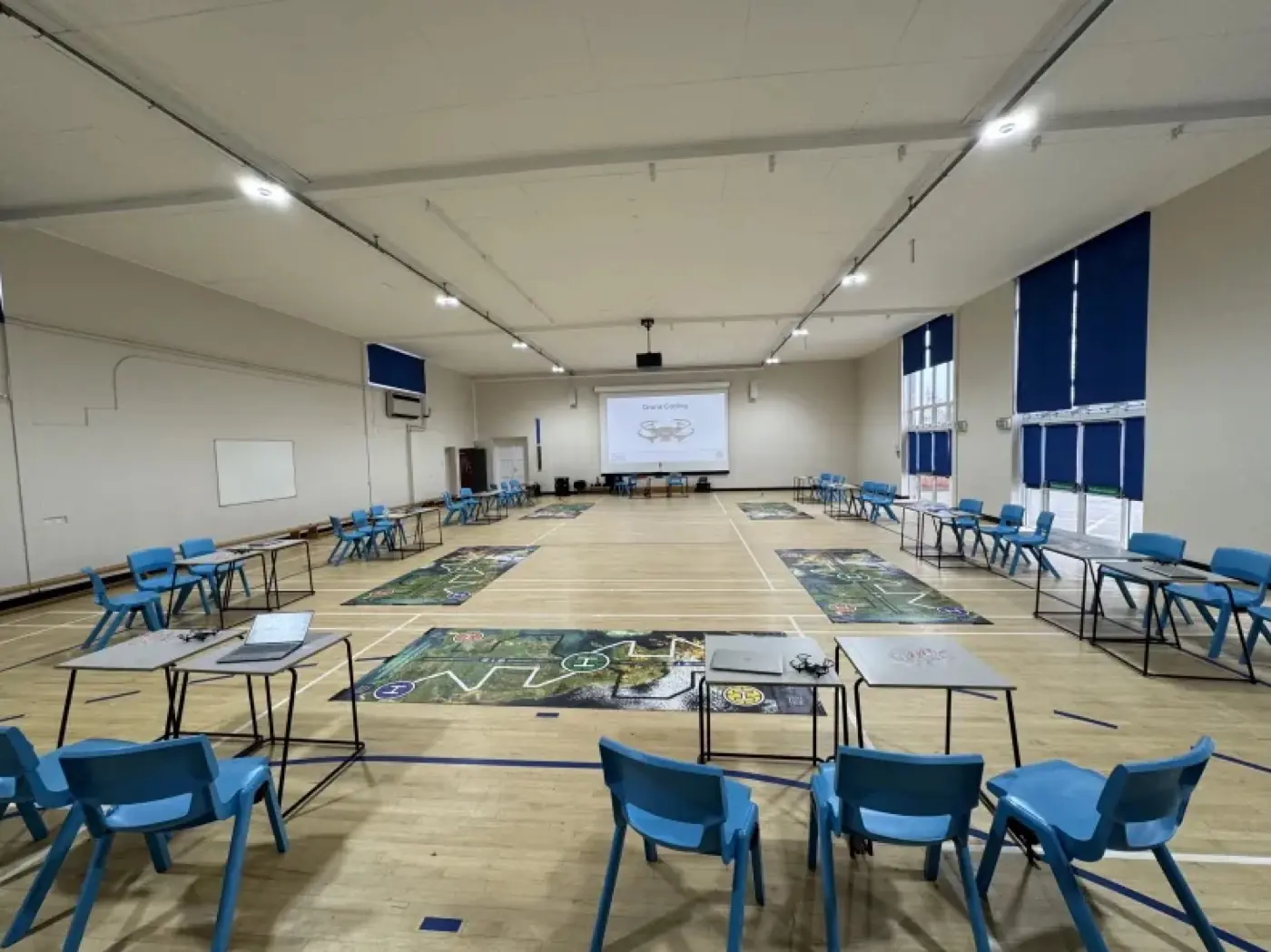
A school hall set up for drone coding, with exam tables around the perimeter, large drone floor mats laid out in the centre, chairs for students and a projector at the front showing the Drone Coding workshop

Exam tables around the perimeter, drone mats in the centre.

Photo 1 of 5: A school hall set up for drone coding, with exam tables around the perimeter, large drone floor mats laid out in the centre, chairs for students and a projector at the front showing the Drone Coding workshop
Drone Coding
KS2-KS5 (ages 7-18)
Hall required32Hall is essential so drones can fly safely away from desks. Exam or paired tables around the perimeter for laptops, or benches/chairs if tables are not available. Drone mats in the central activity area. Projector at the front.
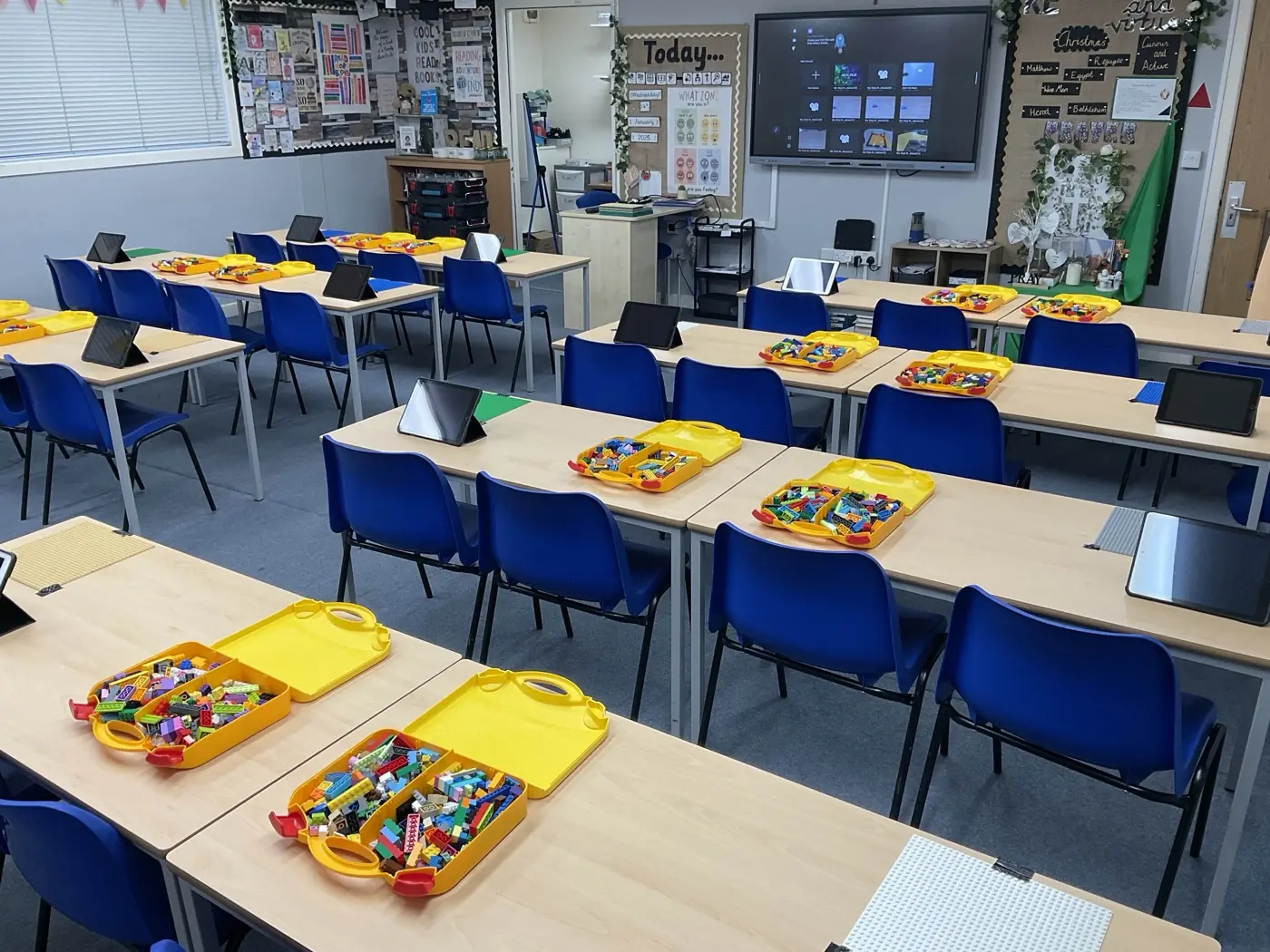
A primary classroom set up for stop-motion animation, with desks in pairs and tablets, animation kits and Lego trays at each station

Desks in pairs with tablets and Lego trays on each desk.

Photo 1 of 2: A primary classroom set up for stop-motion animation, with desks in pairs and tablets, animation kits and Lego trays at each station
Stop-Motion Animation
KS1-KS2 (ages 5-11)
Classroom32Desks in pairs or groups of four (one desk per pair). Projector or screen at the front.
A school hall set up for stop-motion animation, with trestle tables in pairs and tablets at each station

Trestle tables in pairs with tablets. Up to 45 students.

Stop-Motion Animation
KS1-KS2 (ages 5-11)
Hall45Trestle tables in pairs or small groups (around 15 tables for 45 students). Tablets and animation kit at each station. Projector at the front.
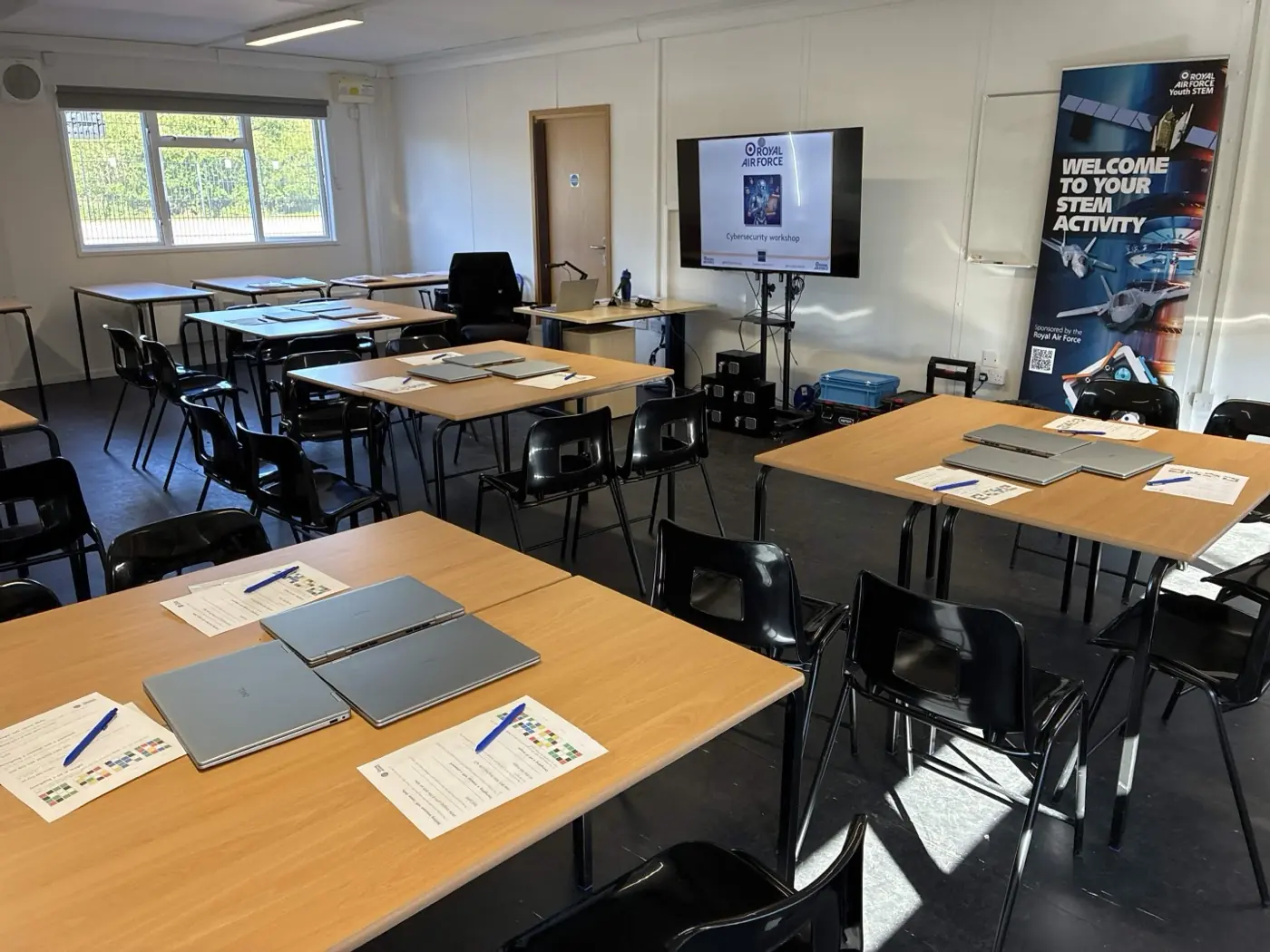
A classroom set up for Cybersecurity & Cryptography, with desks in pairs, laptops on every desk, RAF Youth STEM branding at the front and a projector ready to display the workshop

Desks in pairs with laptops on every desk.

Photo 1 of 2: A classroom set up for Cybersecurity & Cryptography, with desks in pairs, laptops on every desk, RAF Youth STEM branding at the front and a projector ready to display the workshop
Cybersecurity & Cryptography
KS2-KS3 (ages 7-14)
Classroom32Desks in pairs (one desk per pair, 16 desks for 32 students). Laptops provided by Hyett, one on each desk. Projector or screen at the front.
A school hall set up for Cybersecurity & Cryptography, with exam tables in rows and laptops at each station

Exam tables in rows with laptops at each station.

Photo 1 of 2: A school hall set up for Cybersecurity & Cryptography, with exam tables in rows and laptops at each station
Cybersecurity & Cryptography
KS2-KS3 (ages 7-14)
Hall32Tables grouped in threes (the workshop uses one cryptography safe per team of three, so tables need to be grouped rather than paired). Exam tables in rows or trestle tables in groups across the hall. Laptops at each station. Projector at the front.
A classroom set up for a laptop-based workshop, with desks in pairs and laptops on every desk (representative of the 3D Design & Printing setup; dedicated photo to follow)

Representative laptop classroom (3D Design dedicated photo to follow). Same layout as Cybersecurity.

Photo 1 of 2: A classroom set up for a laptop-based workshop, with desks in pairs and laptops on every desk (representative of the 3D Design & Printing setup; dedicated photo to follow)
3D Design & Printing
KS2-KS3 (ages 7-14)
Classroom32Desks in pairs with laptops at each station. Projector or screen at the front. Internet access required. A desk and power socket at the front for the 3D printer.
What your school provides, what Hyett brings

You do not need to source any specialist equipment. The split is the same for every workshop and we confirm it with you again in your booking emails.

What your school provides

  • The room (classroom or hall) per the table above
  • Tables and chairs in the layout shown in the photo
  • A projector, screen, or interactive whiteboard if available
  • Access to power sockets near the working area
  • A member of school staff in the room throughout the session

What Hyett brings

  • All workshop equipment (robots, drones, laptops, circuits kits, animation kit, and so on)
  • All teaching resources and student-facing materials
  • Workshop-specific risk assessments and DBS-checked instructor
  • Pre-workshop liaison and a clear setup brief before the day
  • Setup and pack-down inside the timetable we agree with you

Not sure which setup is right for your school?

Reply to your booking email or give us a call. We are happy to look at your group sizes and recommend the right space.

Workshop Room Setup Guide: Classroom or Hall, by Workshop | Hyett Education